


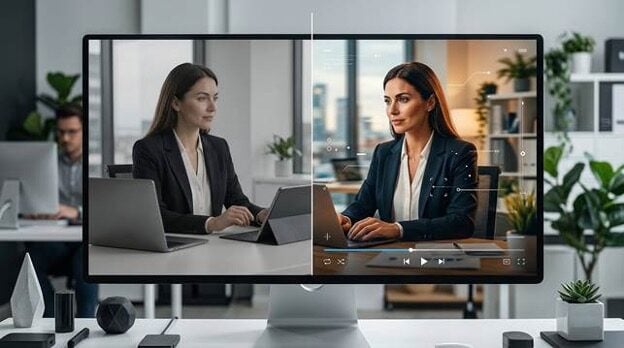
Abstract: You no longer need a complex desktop workflow to make a business image feel polished and useful across more channels. This article explains how AI tools help you improve photo editing, turn still images into short motion assets, and get more value from every strong business photo.
If you work with business photos, you already know the pressure that comes with every image. A headshot has to feel confident. A product photo has to look clean and premium. A restaurant interior has to feel inviting before anyone walks through the door. When the picture feels flat, the whole message loses energy. That is why more teams are rethinking what professional photo editing should do for them in everyday work.
You are not only fixing light, color, or sharpness anymore. You are trying to hold attention in busy feeds, crowded inboxes, fast landing page visits, and short ad placements. A strong still image still matters, but many brands now want that same image to carry more feeling and more movement. This is where AI changes the workflow in a way that feels practical, not just trendy.
Part 1. Why business photos need to do more than look polished
In the past, a finished photo was often the final deliverable. Now you may need that same image for a website banner, a social post, a client presentation, a paid ad, and a short teaser clip. If you rely on separate shoots or extra editing rounds for every format, your schedule gets crowded fast. Your budget also stretches thin, even when the original photo is already good.
This gets frustrating when the image has real business value but still feels too still. Maybe your founder portrait looks professional but not warm enough for social media. Maybe your product shot is sharp but not dynamic enough for a campaign. You do not want to throw the image away. You want to make it work harder.
Part 2. What AI is changing in professional photo editing
The biggest shift is not that AI replaces creative judgment. It is that AI reduces the amount of tedious work between your idea and your final asset. You can clean up a portrait, improve visual clarity, and explore motion from a single still without opening a complex editing suite. That matters when you need speed, consistency, and enough flexibility to test more than one visual direction.
For many teams, the most useful change is reuse. Instead of building a fresh motion asset from nothing, you can start with one approved image and adapt it for more placements. This helps when you have a small team, a tight campaign window, or a client who wants more output without another full production cycle.
Part 3. How Relumi fits the modern business image workflow
If you are trying to move faster without making your visuals feel cheap, tools like Relumi can feel useful because they make advanced image tasks easier to approach on mobile. That does not mean every photo should become a dramatic effect. It means you can take a business image that already works and give it a little more life, which is often all you need for better engagement.
This matters because modern photo editing is not only about cleaning up flaws. It is also about shaping how the image performs after it is published. A still portrait can become a more expressive profile asset. A product image can become a short motion clip for a campaign. A service brand can turn one careful shoot into a wider set of creative assets.
In that sense, an AI photo to video converter is less about novelty and more about getting stronger business value from visuals you already trust. When you only have one strong image and a lot of places to use it, this kind of workflow can feel practical, creative, and cost aware at the same time.
Why this workflow feels useful in real business settings
You save time because one approved image can support more than one channel. You reduce creative friction because your team has fewer handoffs. You also avoid unnecessary reshoots when the original image already has the right mood. Most importantly, you get a better chance of making people pause and look before they scroll away.
Part 4. How to animate a business photo on mobile
If you want a business image to feel more engaging without building a full video from scratch, a simple mobile workflow can help. The official Relumi app guide includes a photo animation process that feels approachable when you are working on a deadline.
Step 1. Choose the business photo you want to animate
Start with a clear headshot, product image, or branded scene. A strong source photo gives the motion a cleaner, more professional look, which makes the result easier to use in real client or campaign work.
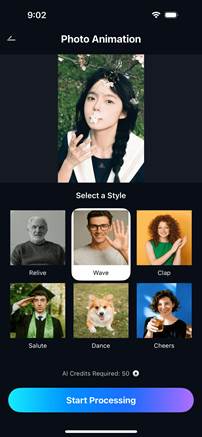
Step 2. Start the photo animation process on mobile
Once your photo is selected, you can begin the animation on mobile. This saves time when you need a quick asset for a campaign, and it removes the need for a heavy editing setup.
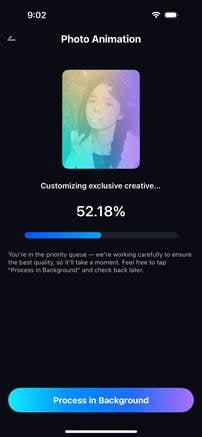
Step 3. Review the motion before you publish it
Review the result and make sure the motion supports your message. A business visual should feel polished, clear, and easy to publish across your website, social content, or short ad creative.

Step 4. Save the finished clip for campaigns and client work
When the preview looks right, save the clip and use it where a still image feels too quiet. This helps one strong business photo support more than one placement without another full production round.

Part 5. Where animated business photos create the most value
One of the best use cases is personal branding. If you rely on founder photos, coach portraits, consultant headshots, or speaker images, subtle motion can make your profile feel more present without losing professionalism. This can help when you want your social content to feel warmer and more memorable while still staying polished.
Another strong use case is product marketing. A static product shot can look great on a product page, but a short motion based version can feel stronger in ads, stories, and promotional clips. When people see movement, they often spend a little more time looking. That extra moment can make a real difference when you are trying to earn attention in a crowded space.
Hospitality, real estate, beauty, and retail brands can also benefit from this approach. A lobby photo, a treatment room, or a styled corner of a store can feel more inviting when you add gentle motion. You are trying to bring viewers closer to the feeling they would have in the space itself.
There is also a practical side for agencies and freelancers. When you can present a still image and a motion ready version from the same source, your pitch feels more complete. Your client sees more possibilities before approving another production budget.
Quick comparison: static image use versus motion ready use
| Business goal | Static photo alone | Motion ready version |
| Personal brand | Looks professional but can feel distant | Feels more present and memorable |
| Product promotion | Shows the item clearly | Adds energy for ads and social content |
| Hospitality marketing | Highlights the space | Helps viewers imagine the atmosphere |
| Client pitch | Presents one finished image | Shows broader creative potential |
The deeper advantage is emotional clarity. Business visuals perform better when they feel human, not just polished. If your audience only has a few seconds, movement can help them sense confidence, warmth, or energy more quickly.
Conclusion
Professional photo editing is changing because your audience expects more from every image you publish. You still need quality, but you also need flexibility, speed, and a way to make strong visuals travel further across channels. That is why AI tools are becoming part of the workflow for more brands, creators, and client teams.
If you already have a solid photo, you may not need a full video crew to make it work harder for your business. You may simply need a smart way to refine it, animate it, and reuse it in more places. When you approach the process this way, business photography feels less like a one time output and more like an asset that keeps creating value.

0 Comments