


Have you ever wanted to convert your picture into a video? Such a fictional conception has become true thanks to contemporary tools, including an AI image animator. These picture-to-video applications scan an image and add a natural flow, transforming it into a short video.
Nowadays, people are using AI photo animators to make clips without editing skills. In this article, we will present a reliable tool and explain how it works. We will also explore how you can use it to bring your own pictures to life.
Part 1. What is an AI Image Animator and How it Works
Simply put, an AI image animator is a tool that uses artificial intelligence to analyze a photo and predict realistic motion for it. It manipulates facial expressions and camera moves to make a short video, therefore turning the photo into a life-like creation.
How it Works
To make an image move, these AI image animators complete specific processes, which are detailed below:
- Image Analysis and Depth Mapping: The AI scans your static photo and detects subjects and background details. Then, it builds a rough 3D depth map from the flat image you provided.
- Motion Planning: Based on the selected style or preference, the AI model plans camera pans or subtle movements for each scene element.
- Frame Generation and Video Rendering: During the process, the system will also insert in between frames and apply earned motion patterns. All of this converts it into an animated clip or looping video.
Why “Bring Photos to Life Now” Features Are Trending
The question that forms is, why are these lifelike photos trending now? To answer this question, explore the reasons behind the growing trend of lifelike photos:
- Doom-Scrolling: People are obsessed with doom-scrolling and crave content that can be viewed in seconds. Animated photos stand out from static images and grab everyone’s attention, making the rewatch rate high.
- Easy and Low-Cost Videos: “Bring photos to life now”tools allow everyone to create cinema-style videos with no editing skills or fancy equipment. Therefore, short-form videos are more accessible and widespread than ever.
- Emotional Nostalgia: Who doesn’t love watching old family pictures? With these tools, memories can now talk, dance, and move, turning simple photos into fun, shareable moments.
- Social Media Trends: Platforms such as Facebook, Instagram, and X thrive on motion-first content. Moving photos become fast meme trends, helping posts travel further and perform better.
Part 2. AI Image Animator vs. Traditional Animation Methods
As mentioned earlier, using an AI image animator is far easier and less costly than traditional animation methods. To understand the differences between the two methods, take a look at the comparison table below:
| Parameter | AI Image Animator | Traditional Animation Methods |
| Skill Set Required | No skills required; beginner-friendly | Knowledge about drawing, animations, motion-design skills, and complex software tools |
| Completion Time | A few minutes maximum | Weeks to months for storyboarding, polishing, and rendering |
| Cost and Resources | Low cost; no big team or studio required | Software, creative teams, and studio costs |
| Customization Level | Presets and prompts are available for quick content | Full control over every frame and style |
| Workflow | AI automated | Manual steps such as rigging, cleanup, keyframing, and compositing |
| Uses | Social media, Brand promotions | Films, TV series, Campaigns, Complex Storytelling |
Part 3. Best AI Image Animator Tools to Make an Image Move Online
At times, we take a special photo and wonder if it was cleaner, sharper, or more dynamic. Users no longer need to wonder about this, as there is a modern solution like Relumi. It is an AI-powered photo studio that helps sharpen blurry images, restore old photos, and transform static pictures into short eye-catching videos.
So, instead of trying to learn complicated software or hiring a professional animator, this tool offers a simple solution. It is available on both the Play Store and App Store, so users can experiment with creative styles using simple prompts.
Key Features
Relumi acts as an ideal AI image animator, and here are some features that prove why:
- AI Photo Animation: Scans the photo and then adds natural motion so that the portrait turns into a short, animated clip.
- Image Enhancer and File Repair: Beyond styling, this app reduces noise, restores details, and even repairs damaged image files, all in one interface.
- AI Filters and Creative Styles: One-tap filters and effects quickly convert photos into cartoons or 3D dolls.
- Smart Photo Correction: It focuses and enhances pictures with minimum effort and also eliminates any clutter in the photos, making them tidy and ready to be shared.
- Portrait Retouching: ID photos or profile pictures can be made to look professional by retouching the skin or changing outfits.
Part 4. Step-By-Step: Use an AI Image Animator to Animate Photos
Here, go through the steps below to bring photos to life using the Relumi app:
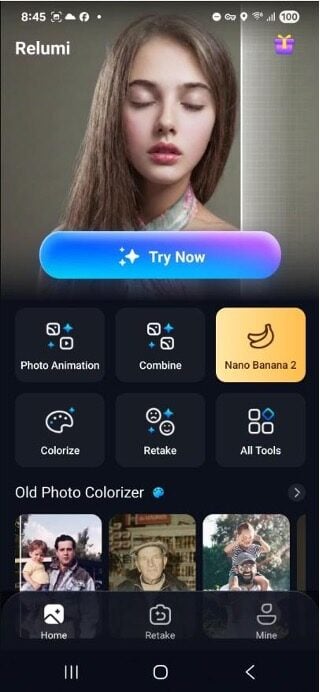
Step 1. Navigate to Photo Animation and Upload Photo
To begin, tap the “Photo Animation” option on the main interface and upload a photo.
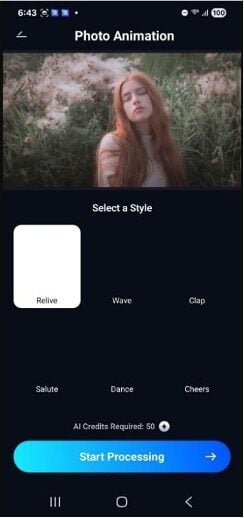
Step 2. Select a Style and Start Processing
Here, select any style, such as “Relive,” and press the “Start Processing” option at the bottom of the screen.
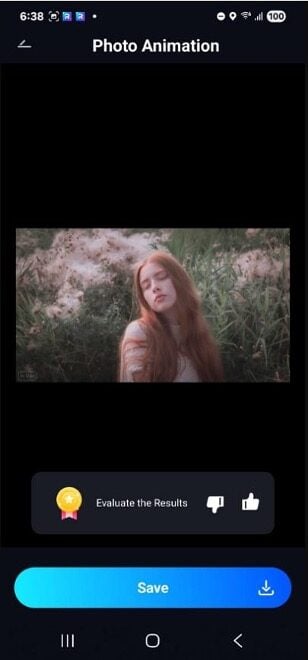
Step 3. Preview and Save
Finally, once the process is finished, you can preview the result and just tap the “Save” option to export the new animated video to your gallery.
Part 5. Creative Use Cases to Bring Photos to Life Now
There are many scenarios where users can avail themselves of the photo animation feature by Relumi. Here, let us discuss a few creative cases for using an AI image animator:
- Before and After Transformations: Bring life to your beauty, fitness, or home makeover photos with smooth camera pans, highlighting the comparison in a short video clip.
- Product Highlights: Make brand products pop off the screen or gently float by adding playful motion and draw the audience’s attention and make them interested in your posts.
- Social Media Avatars: Using this tool, you can make your avatar unique on Instagram or TikTok, as moving hair or blinking eyes can leave an impression.
- Old Family Photos: Photos of your grandparents or childhood snaps can smile, turn, and wave, turning nostalgic moments into lifelong mini videos.
Conclusion
To conclude, AI photo animation is rapidly changing how people make and share memories. Still pictures can be transformed into amazing, entertaining, and cost-effective videos. From reviving old family pictures to boosting social media followers, these tools make images move with the press of a button. If you want a simple way to animate and enhance your photos, the Relumi app is a great place to start.

0 Comments